One OpenAI-compatible API, every ModelRouters model.
Change the base URL, use your ModelRouters key, and select any model id below. The same account can use hosted credits, BYOK connections, browser chat, and optional persistent memory.
Available hosted models
These exact ids work in the model field today. GET /v1/models is the runtime source of truth.
| Provider | Model | API model id |
|---|---|---|
| DeepSeek | DeepSeek V4 Flash | deepseek-v4-flash |
| DeepSeek | DeepSeek V4 Flash — Fast | deepseek-v4-flash-fast |
| DeepSeek | DeepSeek V4 Flash — Reasoning | deepseek-v4-flash-reasoning |
| DeepSeek | DeepSeek V4 Pro | deepseek-v4-pro |
| xAI | Grok Build 0.1 | grok-build-0.1 |
| xAI | Grok 4.3 | grok-4.3 |
| xAI | Grok 4.20 Non-Reasoning | grok-4.20-0309-non-reasoning |
| xAI | Grok 4.20 Reasoning | grok-4.20-0309-reasoning |
| xAI | Grok 4.5 | grok-4.5 |
| xAI | Grok 4.6 | grok-4.6 |
| Z.AI | GLM-4.5 Air | glm-4.5-air |
| Z.AI | GLM-4.5 | glm-4.5 |
| Z.AI | GLM-4.6 | glm-4.6 |
| Z.AI | GLM-4.7 | glm-4.7 |
| Z.AI | GLM-5 | glm-5 |
| Z.AI | GLM-5 Turbo | glm-5-turbo |
| Z.AI | GLM-5.1 | glm-5.1 |
| Z.AI | GLM-5.2 | glm-5.2 |
| Anthropic | Claude Haiku 4.5 | claude-haiku-4.5 |
| Anthropic | Claude Sonnet 4.6 | claude-sonnet-4.6 |
| Anthropic | Claude Sonnet 5 | claude-sonnet-5 |
| Anthropic | Claude Opus 4.8 | claude-opus-4.8 |
| Anthropic | Claude Opus 5 | claude-opus-5 |
| Anthropic | Claude Fable 5 | claude-fable-5 |
| OpenAI | GPT-5.6 Luna | gpt-5.6-luna |
| OpenAI | GPT-5.6 Terra | gpt-5.6-terra |
| OpenAI | GPT-5.6 Sol | gpt-5.6-sol |
https://api.modelrouters.net/v1Bearer mr_live_...POST /chat/completionsConnect a chat client
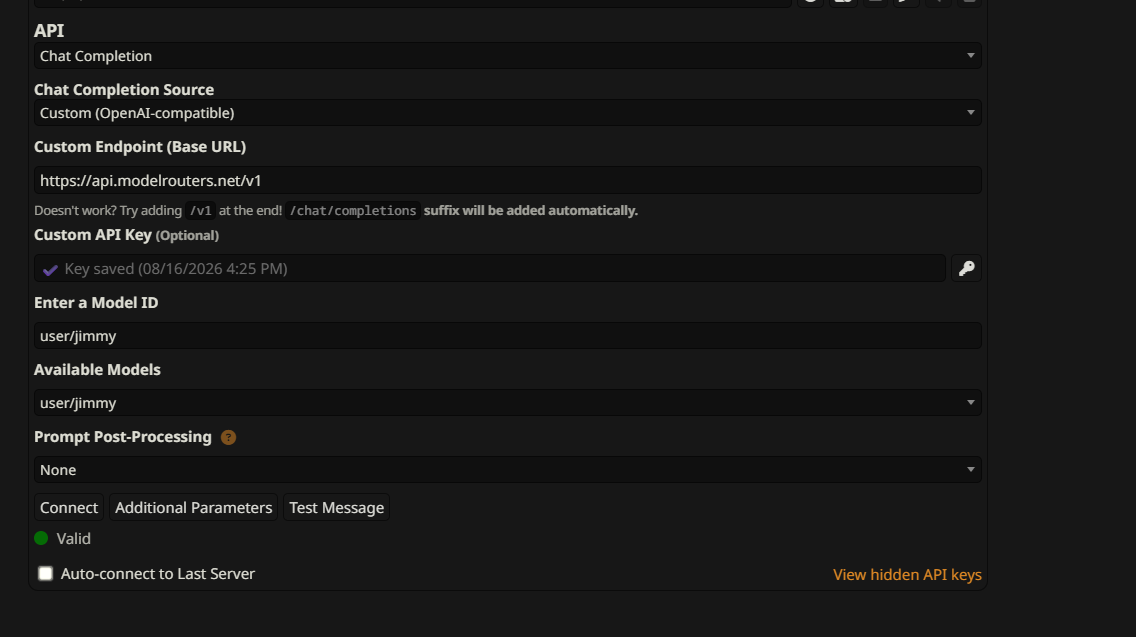
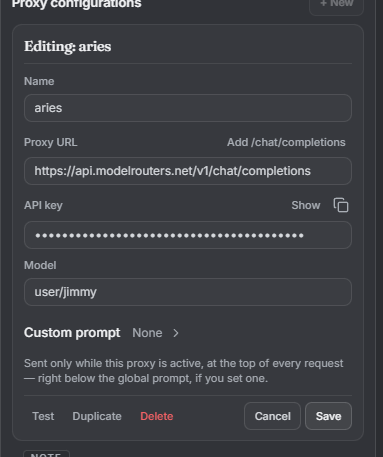
Choose Chat Completion and a custom OpenAI-compatible source. Set the Base URL to https://api.modelrouters.net/v1, enter your ModelRouters API key, and use a hosted model id, an original OpenRouter model id, or one of your optional private user/<alias> model ids. When the client appends /chat/completions automatically, do not add that suffix to the Base URL yourself.
Connect a provider
Bring-your-own-key routing is free. DeepSeek is the recommended direct BYOK starting point, while other supported providers follow the same setup. Your provider bills model usage directly; ModelRouters keeps the connection credential encrypted at rest.
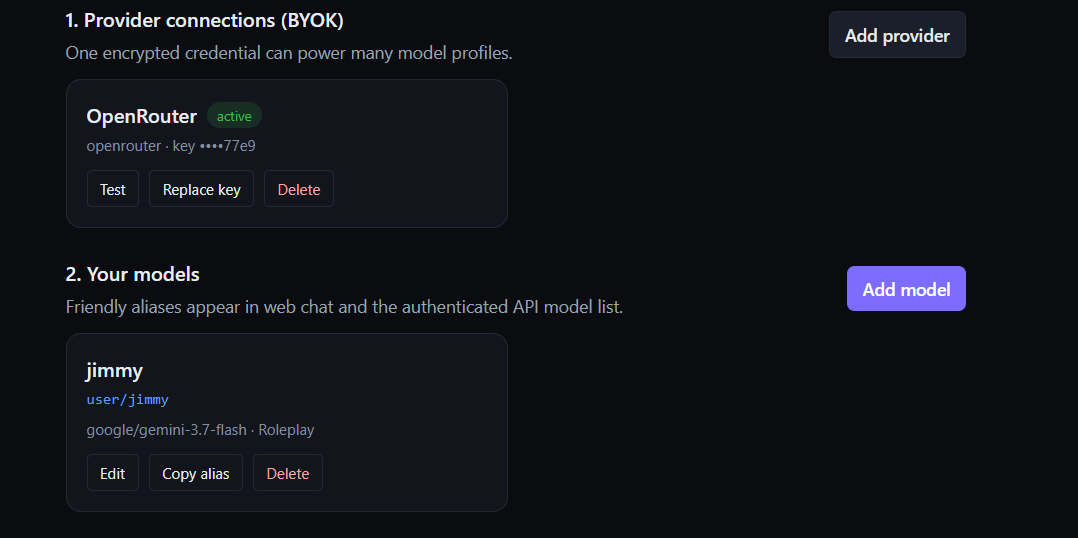
- 1. Add a provider. Choose the provider, paste its API key, and save the connection.
- 2. Test the connection. Confirm the credential and upstream endpoint work before routing chat.
- 3. Route OpenRouter directly. With an OpenRouter connection, send its original provider/model id unchanged.
- 4. Add aliases only if useful. Optional
user/<alias>profiles add a friendly name, preset, persona, or roleplay mode.
user/jimmy alias.Quick start with curl
Create a key in the dashboard, keep it server-side, and send a normal Chat Completions request.
export MODELROUTERS_KEY="mr_live_..."

curl  https://api.modelrouters.net/v1/chat/completions \
  -H "Authorization: Bearer $MODELROUTERS_KEY" \
  -H "Content-Type: application/json" \
  -d '{
    "model": "deepseek-v4-flash",
    "messages": [
      {"role": "user", "content": "Write a two-line welcome message."}
    ]
  }'
Use the OpenAI SDK
Existing OpenAI Chat Completions integrations usually need only a new base URL, API key, and model id.
Python
import os
from openai import OpenAI

client = OpenAI(
    api_key=os.environ["MODELROUTERS_KEY"],
    base_url=" https://api.modelrouters.net/v1",
)

response = client.chat.completions.create(
    model="deepseek-v4-flash",
    messages=[{"role": "user", "content": "Hello"}],
)
print(response.choices[0].message.content)
JavaScript
import OpenAI from "openai";

const client = new OpenAI({
  apiKey: process.env.MODELROUTERS_KEY,
  baseURL: " https://api.modelrouters.net/v1",
});

const response = await client.chat.completions.create({
  model: "deepseek-v4-flash",
  messages: [{ role: "user", content: "Hello" }],
});
console.log(response.choices[0].message.content);
Streaming
Set stream: true. ModelRouters returns standard server-sent Chat Completions chunks.
const stream = await client.chat.completions.create({
  model: "claude-sonnet-4.6",
  messages: [{ role: "user", content: "Tell me a short story." }],
  stream: true,
});

for await (const chunk of stream) {
  process.stdout.write(chunk.choices[0]?.delta?.content ?? "");
}
Memory + saved chats
Launch saleThe bundle is regularly $6/month and currently $3/month. New accounts can activate 30 days free without a card. The trial ends automatically with no charge; continuing at the launch price requires a separate paid subscription. Subscribing activates persistent memory and encrypted saved chats automatically; no request-body change is required. You can disable either feature from the dashboard, and your relevant memories follow you when you switch models. The complete first user prompt remains available in the encrypted Saved Chat and can be edited into a new fork. Memory facts are derived and stored separately; saving the prompt does not cause it to be re-injected on every request.
Configure memory →Bring your own key
Connect DeepSeek or another provider in the dashboard. Routing is free; your provider bills inference directly. An OpenRouter connection accepts original provider/model ids without an alias. Optional private aliases use:
user/<your-alias>Authenticated GET /v1/models includes your aliases. Legacy byok:<id>:<model> routes remain supported for existing integrations.
Endpoints and responses
| GET /models | List models currently exposed by the API. |
| POST /chat/completions | Create a streamed or non-streamed chat completion. |
| Authorization | Send your ModelRouters key as a Bearer token. |
HTTP 401Missing or invalid API key
HTTP 402Hosted credits or memory subscription required
HTTP 404Unknown, retired, or inactive model/connection
HTTP 429Request capacity or rate limit reached